
How can I ssh/sftp access to my debian in root
You will have to
nano /ect/ssh/sshd_config
and alterate AllowRootLogin line to AllowRootLogin yes
then restart ssh:systemctl restart ssh
Where I can find my stream url ?
You can find all active mountpoint url @ http://debianip:8000/status.xsl
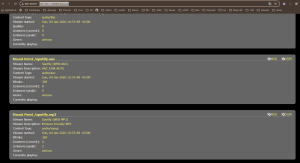
for example, one radio url here is http://192.168.1.73:8000/spotify.aac
What about docker edition ?
I’ve setup a docker with ssh and x11 support via no-vnc to achive both free and premium edition
here is the corresponding docker-compose to adapt
services:
  debian13-gui:
    image: chourmovs/debian13-vnc-novnc-ssh:latest
    container_name: debian13-gui
    restart: unless-stopped

    # Alpine host: /dev/snd peut ne pas exister au déploiement => pas de devices:
    # privileged pour ne pas bloquer le stack et permettre l'accès aux devices si dispo.
    privileged: true
    network_mode: host


    environment:
      USERNAME: "debian"
      USER_UID: "1000"
      USER_GID: "1000"

      SSH_PASSWORD: "hackme"
      VNC_PASSWORD: "hackme"

      ROOT_PASSWORD: "hackme"
      ALLOW_ROOT_SSH: "yes"

      VNC_GEOMETRY: "1600x900"
      VNC_DEPTH: "24"


      # IMPORTANT: en host mode, ce port est le port HÔTE
      ICECAST_PORT: "28000"

    shm_size: "512m"

    volumes:
      - debian13_home:/root

volumes:
  debian13_home:
Why premium is not working out of the box as free edition
Due to usage of spotify linux desktop client in the premium edition, at first launch you will need to access debian graphical session to identify in spotify. This login is supposed to be run onced and kept alive across reboot of the debian machine.
I’ve configured the script to install a lightweigh enlighten desktop, so when x11 session has started, right click on the desktop, launch command or app “spotify” thn follow instructions on screen.
What is the conceptual difference between free and premium ?
The main difference between the two implementations is that free is setting spotifyd as spotify connect bridge while premium is setting official spotify linux client to achieve the same goal
What are options offered by binaries
Usage of ./spotifyd-free (or spotifyd-premium): –arg value Argument passed to the script (repeatable)
-cmd string
Command: install|uninstall|status|list (default “install”)
-interactive
Runs the script in console mode (TTY). Required if the script requests a password. (default true)
-tee
Stream stdout/stderr live while capturing (non-interactive mode) (default true)
-timeout duration
Timeout global (ex: 2m, 30s) (default 10m0s)
-workdir string
Working directory (optional)